
Why You Need an SDLC Framework in WordPress Projects
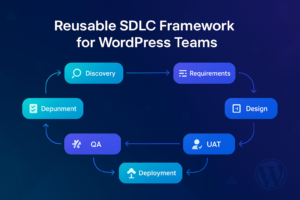
WordPress development often evolves organically—projects grow from client requests, plugins get added reactively, and documentation lags behind implementation. But for agencies and developers scaling up, this ad hoc approach won’t cut it. Delivering reliable, maintainable, and client-ready WordPress solutions requires more than code—it demands process.
Enter the Software Development Life Cycle (SDLC): a structured approach to planning, building, testing, and maintaining software. While traditional SDLC models (like Waterfall or Agile) offer value, WordPress teams need a flexible, reusable SDLC framework—one that adapts enterprise-grade discipline to the fast-moving world of WordPress development.
This article walks you through how to build that framework using best-in-breed practices drawn from software engineering, project management, DevOps, UX, and agency workflows.
Step 1: Define Your SDLC Stages
Start by customizing the classic SDLC stages to fit the way your WordPress team works. A minimal viable WordPress SDLC might include:
- Initiation & Discovery
- Requirements Gathering
- Architecture & Design
- Development
- Quality Assurance (QA)
- User Acceptance Testing (UAT)
- Deployment
- Maintenance & Continuous Improvement
Each stage should be explicitly defined with:
- Entry/exit criteria
- Artifacts (e.g., a sitemap, a prototype, a feature spec)
- Responsible roles (e.g., PM, Developer, QA)
Tip: Write a one-pager for each stage to standardize internal communication.
Step 2: Map Toolchains to Each Stage
Agencies tend to mix tools from different ecosystems (Atlassian, Google, GitHub, Slack). Your SDLC framework should embrace this reality by explicitly mapping tools to stages.
| Stage | Tools |
|---|---|
| Discovery | Miro, Notion, Loom |
| Requirements | Google Docs, Formidable Forms (prototypes) |
| Architecture & Design | Figma, Draw.io, CPT UI + ACF/Meta Box |
| Development | VS Code, GitHub, WP CLI |
| QA | Ghost Inspector, Playwright, BrowserStack |
| UAT | Staging Sites, Formidable Views |
| Deployment | GitHub Actions, WP Engine, Kinsta |
| Maintenance | Kanban board (ClickUp, Trello), Uptime Robot |
Don’t reinvent the wheel—curate and integrate.
Step 3: Create Reusable Artifacts and Templates
Each project stage should produce artifacts that can be templated and reused:
- Discovery Brief – stakeholder matrix, business goals
- Requirements Document – user stories, data models, mockups
- Dev Kickoff Checklist – plugin stack, branch naming, code standards
- QA Script – test case template with acceptance criteria
- Change Request Form – what triggers re-scoping
- Go-Live Checklist – DNS, backups, caching, security
- Post-launch SOP – support tiers, patch cycles, metrics
Store these templates in a shared drive or internal wiki so your team can standardize delivery.
Step 4: Layer in Governance and Flexibility
Your SDLC shouldn’t be rigid—it should be structured but adaptable. Add two layers to your framework:
- Governance: When do you escalate a decision? Who signs off on scope or risk? Use a lightweight RACI chart or project charter template.
- Adaptation Rules: When can you skip or compress a phase? For example:
- Discovery may be skipped for repeat clients.
- QA/UAT may be merged for minor updates.
- Maintenance plans vary based on support level.
This builds trust while keeping velocity high.
Step 5: Train Your Team and Clients
An SDLC only works if everyone understands it. Offer lightweight training in the form of:
- Internal lunch-and-learns
- Short Loom videos walking through each phase
- A one-page SDLC overview you give to clients at kickoff
Clients benefit from seeing your process, and your team benefits from consistency.
Step 6: Implement Feedback Loops
An SDLC framework isn’t set in stone. Every post-launch phase should include a retrospective:
- What went well?
- What delayed us?
- Which template or checklist needs improvement?
Track this feedback in your Kanban or PM system and revise the framework quarterly. This is your continuous improvement loop—the most enterprise-grade habit you can adopt.
SDLC for Formidable Forms Teams
If you’re building enterprise apps with Formidable Forms, your SDLC should incorporate:
- Prototype forms during requirements
- Views for UAT demos
- Custom code repository for hooks/actions
- Exportable form bundles for deployment
Your framework should treat Formidable not just as a plugin, but as a UI-builder, API interface, and business logic layer.
Final Thoughts: Your Framework, Your IP
A reusable SDLC framework becomes an asset for your WordPress agency. It raises your maturity, impresses clients, reduces rework, and protects against team turnover. The best part? Once you’ve built it, it scales with you—whether you’re launching brochure sites or enterprise applications.
Stop reacting. Start engineering.

Leave a Reply