
By Victor M. Font Jr., Developers Corner

Let’s imagine for a moment: the Headless Horseman is galloping through a digital forest. He’s fast, formidable, and terrifyingly efficient. But unless someone controls the bridge, he can cross into places he shouldn’t—like your sensitive data.
In the world of headless WordPress, that bridge is your authentication system. And in this article, we’re fortifying it with modern best practices for:
- Single Sign-On (SSO)
- REST API security
- Token-based authentication
- Custom access control for Formidable Forms data
Let’s get our horseman over the bridge—without leaving the gate open behind him.
Why Authentication and API Security Matter in Headless WordPress
In a traditional WordPress site, authentication is mostly session-based. But once you decouple the frontend, you’re in API territory. Now you need to:
- Authenticate external clients (React, mobile apps, other servers)
- Authorize user-specific access to entries and forms
- Protect sensitive or PII data from being exposed via open REST routes
Authentication Options in a Headless WordPress Stack
There are multiple ways to authenticate users with a headless frontend:
1. Cookie Authentication
- Uses WordPress’s built-in login cookie.
- Easy but only works within the same origin (same domain and browser).
2. Application Passwords
- Each user generates an app password.
- Sent as HTTP Basic Auth: Authorization: Basic base64(user:app_pass)
- Useful for trusted apps but lacks granular control.
3. JWT (JSON Web Tokens)
- Token issued upon login, stored on client.
- Sent in Authorization: Bearer <token> header.
- Stateless and scalable across microservices.
4. OAuth2 (SSO Integration)
- Used for “Sign in with Google,” “Sign in with Apple,” etc.
- Best for enterprise SSO platforms like Okta, Azure AD, or Auth0.
Registering Secure REST API Endpoints
Since Formidable Forms does not expose native permission filters like frm_rest_can_access_entry, we’ll build a custom endpoint to return entry data securely:
Sample Secure Endpoint with Custom Permission Logic:
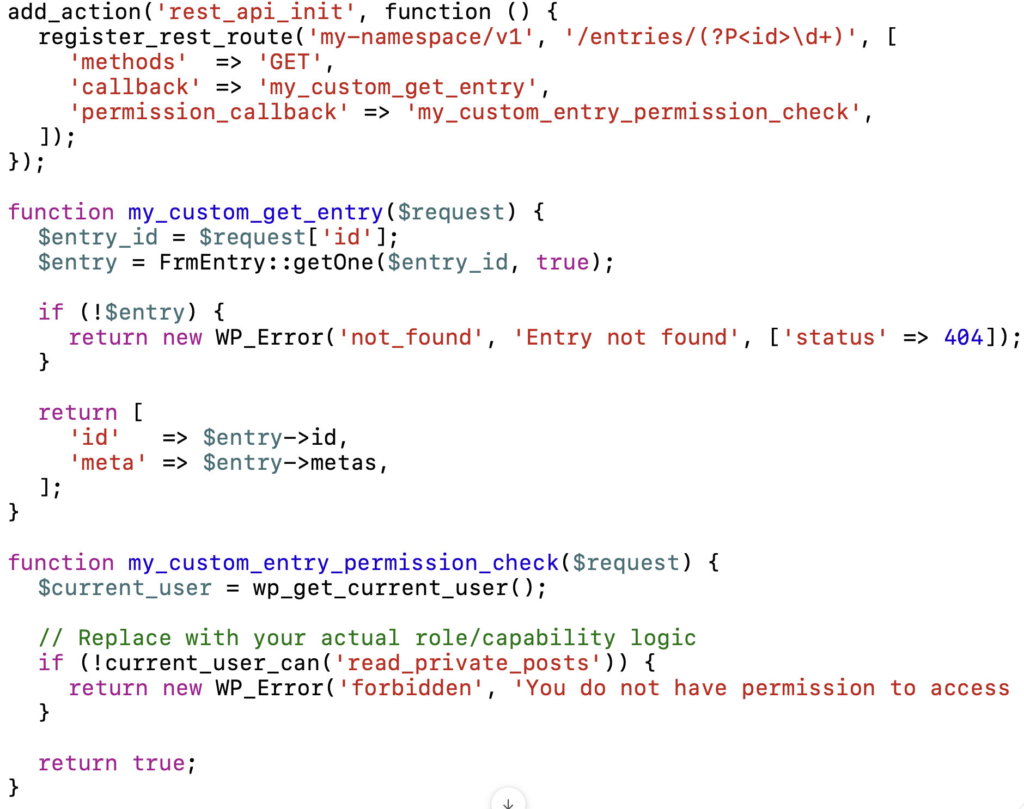
This approach provides the control that the missing Formidable hook cannot. You own the route. You gatekeep the access.
Verifying Identity: Token Flow and Reverse Proxies
Once SSO or token-based logins are introduced, the identity token must be verified:
- JWT tokens must be decoded and validated on the server
- OAuth tokens should be checked against the issuer’s introspection endpoint
- Reverse proxies like Kong, Amazon API Gateway, or Cloudflare can handle token validation before WordPress is even touched
This layered approach minimizes risk and aligns with modern zero-trust models.
Headless Wisdom
“Security isn’t a feature—it’s a design decision made early or paid for later.”
Takeaways:
- Enterprise-grade authentication starts with intentional system design, not patchwork fixes.
- WordPress can support secure SSO and API authentication when built around proper REST practices.
- Avoid relying on undocumented or nonexistent plugin hooks—always verify the integration points.
- permission_callback in register_rest_route() gives you full control over who sees what.
- Gateways, middleware, and token-based identity checks form the bedrock of scalable, secure APIs.
Next up: “The Horseman’s Trail: Deployment Models for Headless WordPress”—We’ll explore how to host, scale, and deploy your frontend and backend pieces—plus tips for staging, CI/CD, and enterprise testing workflows

Leave a Reply