
Go-Live is a Milestone, Not a Finish Line!
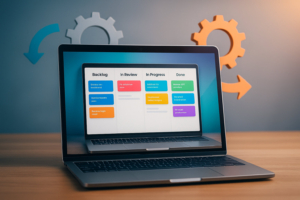
The go-live moment is a milestone—but not a finish line. For developers working with Formidable Forms in enterprise-grade WordPress applications, what happens after launch can often make or break long-term client satisfaction and system integrity.
This article introduces a practical Change Management and Continuous Improvement framework, derived from the IT lifecycle concepts in The Ultimate Guide to the SDLC, adapted for WordPress and Formidable Forms projects.
Why Change Management Matters in WordPress Projects
Most WordPress developers are used to shipping updates on the fly. But for business-critical applications—like CRMs, ERPs, intake systems, or workflow engines powered by Formidable Forms—change must be governed. Without a clear plan, even simple requests can:
- Disrupt existing functionality
- Cause regression bugs in form logic or views
- Bypass stakeholder review
- Undermine user trust
Enterprise clients expect transparency, predictability, and traceability. Change management ensures all three.
Key Concepts from the Change Management Framework
Our framework includes five stages:
- Capture – Centralize all change requests and client feedback.
- Classify – Determine priority, impact, and urgency.
- Evaluate – Analyze feasibility, estimate effort, and perform risk analysis.
- Implement – Deploy changes through a controlled release process.
- Review – Post-implementation testing, documentation, and feedback loops.
Let’s walk through how this applies to Formidable-powered systems.
1. Capture: Using Kanban to Visualize Requests
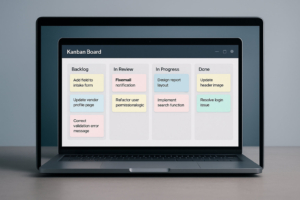
Formidable developers should track all feedback—whether it’s a bug report, an enhancement idea, or user complaint.
Tools:
- Trello, Jira, ClickUp, or Notion (with a Kanban view)
- A dedicated support form built in Formidable Forms that logs entries to a central post type or spreadsheet
Columns to include:
- Backlog (Captured but unreviewed)
- Ready for Review
- Approved for Development
- In Progress
- Pending Client Review
- Deployed
- Closed
Tip: Use Formidable’s Views to display support entries to internal stakeholders or clients, with filters by category or status.
2. Classify: Prioritizing the Right Work
Once a request is logged, you must classify it:
| Factor | Example |
|---|---|
| Type | Bug fix, Feature request, UI change |
| Impact | All users vs single department |
| Urgency | Immediate (e.g. form not submitting) or Low |
| Complexity | Simple label change vs multi-step form logic |
Add labels to your Kanban cards or track these as custom fields in your system.
3. Evaluate: Feasibility and Risk
Before approving a change, especially one that affects Formidable Views, conditional logic, or API actions, consider:
- Will this break existing entries or user workflows?
- Are there dependencies (e.g., calculations, custom PHP hooks)?
- How will this affect mobile responsiveness or accessibility?
Best Practice: Use a staging environment to test all form logic changes before applying them to production.
4. Implement: Controlled Deployment
For Formidable systems, implementation can include:
- Updating forms (add/remove fields, logic, or styling)
- Adjusting Views and their filtering criteria
- Modifying email notifications or actions
- Running SQL or entry migration scripts
- Updating custom code via
functions.phpor a custom plugin
Use version control (e.g., Git in a local + staging + live pipeline), and always document your changes in a changelog.
5. Review: Closing the Loop
Every change should trigger:
- Functional testing
- Regression testing of affected forms and views
- Client or end-user review
- Documentation updates
Encourage clients to use a feedback form or post-update survey to assess satisfaction with the change.
Building a Lightweight Change Management System in Formidable
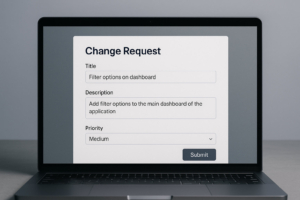
With Formidable Forms, you can:
- Create a Change Request Form with fields like Description, Priority, Affected Module, etc.
- Display entries in a Kanban-style View grouped by status
- Add admin-only comment fields or approval checkboxes
- Send automatic notifications when changes move through stages
This lets you build a fully auditable and client-facing change process—without leaving WordPress.
Final Thoughts: Iterate Like an Enterprise
Continuous improvement isn’t a buzzword—it’s a discipline. By applying change management principles, you move from reactive development to strategic iteration. And for Formidable developers, that means building trust, reducing chaos, and delivering long-term value.
Suggested Resources
- "The Ultimate Guide to the SDLC" – Especially chapters on Change Management and Post-Deployment
- Trello Power-Ups for Agile workflows
- Formidable Views documentation
- WP STAGING, WP Migrate Lite for testing environments
Ready to Improve Your Formidable Project?
Start by tracking your next three client requests using a Kanban board. Classify, evaluate, and review each one with intention. You’ll be surprised how quickly your support system matures—and how much more professional your delivery becomes.
Keep your projects thriving...
Kickstart your continuous improvement cycle today by grabbing our free Change Request Form! It’s a simple, powerful tool to help you capture feedback, manage updates, and keep your Formidable-powered systems running smoothly. Download the form now and take the first step toward hassle-free change management and happier clients!

Leave a Reply