
Bridging Structured Design with Practical WordPress Development
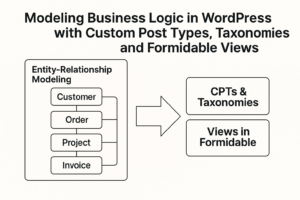
When WordPress developers graduate from content-driven sites to enterprise-grade applications, they quickly realize that content management alone won’t cut it. Instead, we enter the realm of structured business logic—the kind traditionally modeled through entity-relationship diagrams (ERDs) in software engineering.
But here’s the twist: WordPress offers a unique set of tools—Custom Post Types (CPTs), Custom Taxonomies, and Formidable Views—that can bring those traditional design models to life. This article shows how to translate structured design into WordPress-native architectures, enabling developers to build scalable, maintainable applications that reflect real-world business rules.
From Entities to Custom Post Types
In ER modeling, an entity represents a real-world object—something with attributes and relationships. Think Customer, Order, Project, or Invoice.
In WordPress, these map cleanly to Custom Post Types:
| ER Entity | WordPress Equivalent |
|---|---|
| Customer | customer CPT |
| Order | order CPT |
| Job Application | application CPT |
| Real Estate Listing | property CPT |
Why CPTs?
- They persist structured data beyond simple blog posts or pages.
- They integrate with WordPress's REST API, admin UI, and permissions system.
- They play well with Formidable Forms, which can be configured to create or update CPTs from form submissions.
Example:
If you're building a job board, the application CPT can store submissions from candidates via a Formidable form, complete with resume uploads, cover letters, and dynamic relationships to job listings.
Modeling Relationships with Taxonomies (and Beyond)
In an ERD, relationships between entities matter just as much as the entities themselves. These could be:
- One-to-many: A
Companyhas manyEmployees. - Many-to-many: A
Studentcan enroll in multipleCourses, and eachCoursehas manyStudents.
In WordPress, these relationships can be expressed through:
Custom Taxonomies
Used to group and classify post types. Great for categorizing or tagging, and even more powerful when made hierarchical.
Example:
Departmenttaxonomy forEmployeeCPTIndustrytaxonomy forCompanyCPT
Post Relationships
More advanced connections may require plugins or custom fields:
- Formidable Forms’ Dynamic Field relationships
- Advanced Custom Fields (ACF) relationship fields
- WPGraphQL or REST endpoints to model external relationships
Designing Business Views with Formidable Views
Once you've structured your data with CPTs and taxonomies, the next challenge is presenting it in a way that aligns with business logic. This is where Formidable Views shine.
Views as Business Reports
In database design, views are predefined queries that return specific slices of data. Formidable Views operate similarly—they allow you to query and format entries from forms or CPTs.
You can:
- Display a list of orders per customer.
- Show the latest applications per job posting.
- Render dynamic tables, calendars, or directories based on taxonomy filters.
Example:
A real estate platform might use a View to:
- Display properties in a given city (taxonomy:
city) - Filter by property type (taxonomy:
property_type) - Show realtor info dynamically (related CPT:
realtor)
Views + Filters = Business Intelligence
Formidable also allows you to:
- Add user-specific filters (e.g., "My Orders")
- Create dashboard widgets for KPIs
- Export data or perform aggregations
Design-Driven WordPress Development
What we’re doing here is designing WordPress applications with structured analysis in mind. That means:
- Identify entities and their relationships.
- Map those to CPTs, taxonomies, and dynamic fields.
- Use Formidable Views to render information according to business rules.
A Sample Mapping
| Business Requirement | Design Model | WordPress Implementation |
|---|---|---|
| Track customer job requests | Customer, Job | CPTs: customer, jobRelation: Customer ID (dynamic field) |
| Assign team members to projects | Project, Employee | CPTs: project, employeeTaxonomy: team or ACF relationship |
| Approve budget per department | Department, Budget | CPT: budget, Taxonomy: department |
| Generate per-project reports | View on job CPT | Formidable View filtered by project ID |
Final Thoughts
Modeling business logic doesn’t require abandoning WordPress’s architecture. On the contrary—when developers adopt structured thinking, they unlock the power of CPTs, taxonomies, and Formidable Views to create true application frameworks inside WordPress.
It’s time for WordPress developers to stop thinking like theme designers—and start thinking like system architects.

Leave a Reply