
Build More Reliable, Scalable Applications with Formidable Forms
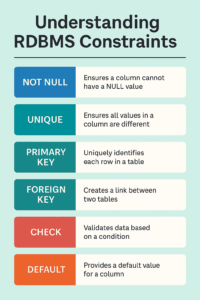
When working with WordPress as an application platform — especially using tools like Formidable Forms — your forms may be beautiful and your workflows automated, but the real power lies in the data your system collects, stores, and reuses.
If you're building enterprise-grade applications — CRMs, portals, ERPs, custom dashboards, or any data-driven system — then understanding Relational Database Management System (RDBMS) constraints is crucial. These constraints are the rules your database uses to maintain order, accuracy, and structure.
And whether you realize it or not, you're already working with them. Every time you make a field required, check for duplicates, or relate one form entry to another, you're re-creating what RDBMSs have handled natively for decades.
Let’s take a look at what these constraints are and how they map directly to your day-to-day work with Formidable Forms and WordPress development.
What Are RDBMS Constraints?
In a relational database, constraints are rules that ensure your data remains valid and meaningful. They prevent:
- Bad entries (like empty names or future birthdates),
- Duplicate records,
- Orphaned rows in related tables,
- And logic violations like negative invoice totals.
Constraints are enforced by the database engine, which means they’re applied consistently — whether data comes from a form, a bulk import, an API call, or manual SQL.
The Core Constraints, Explained
Here are the six most important constraints every developer should understand:
| Constraint | What It Does |
|---|---|
NOT NULL | Prevents empty values in a column |
UNIQUE | Ensures all values in a column are different |
PRIMARY KEY | Uniquely identifies each row in a table |
FOREIGN KEY | Creates a relationship between tables |
CHECK | Validates data against a condition |
DEFAULT | Sets a fallback value if none is provided |
These aren’t theoretical. They have real, actionable parallels in your WordPress development toolkit — especially when you're pushing Formidable Forms to its full potential.
How RDBMS Constraints Map to Formidable Forms Projects
Let’s bridge theory and practice by showing you how each constraint applies directly to building with Formidable.
NOT NULL → Required Fields
Formidable Equivalent: Using the "Required" checkbox in the form builder.
Real Use Case: A client submission form where the “Company Name” or “Total Amount” must never be left empty.
Why It Matters: Prevents incomplete records from entering your reports or integrations.
UNIQUE → Prevent Duplicate Entries
Formidable Equivalent: Custom validation using frm_validate_field_entry or checking for duplicates in PHP.
Real Use Case: Ensuring no two users sign up with the same employee ID.
Why It Matters: Avoids conflicts, especially when syncing with CRMs or payroll systems.
PRIMARY KEY → Identify Entries Reliably
Formidable Equivalent: Each form entry already has a unique entry_id. When using custom tables, define your own.
Real Use Case: Tracking invoices, client cases, or tasks — all tied to a consistent, unique identifier.
Why It Matters: Prevents accidental overwrites and enables reliable updates or lookups via API.
FOREIGN KEY → Relate Entries Across Forms
Formidable Equivalent: Lookup fields, cascading dropdowns, or linking two entries via hidden fields.
Real Use Case: Link "Support Tickets" to "Customers" or "Projects" to "Project Managers."
Why It Matters: Guarantees relationships are valid — no tasks assigned to non-existent projects.
CHECK → Custom Data Rules
Formidable Equivalent: Conditional logic in the form UI or server-side logic using frm_entries_before_create.
Real Use Case: Ensure that submitted hours don’t exceed 40 per week or that a numeric score stays within a defined range.
Why It Matters: Encodes business rules directly into your app’s logic — reducing human error.
DEFAULT → Auto-Fill Missing Values
Formidable Equivalent: Pre-filling hidden fields with shortcodes or PHP hooks.
Real Use Case: Automatically assigning new entries a status of “pending review” if the user doesn’t specify.
Why It Matters: Reduces friction and ensures data consistency during bulk imports or automation.
Why This Matters at the Enterprise Level
When your app scales — more users, more data, more integrations — constraints help enforce data integrity automatically, even when data enters the system outside of Formidable’s UI.
This is especially important if:
- You’re storing data in custom database tables
- You’re writing custom insert logic using
frm_after_create_entryor direct SQL - You’re integrating with external systems that expect clean, relational data
- You’re preparing data for BI dashboards, reporting tools, or audits
Without constraints, your system depends entirely on the application layer to behave perfectly. With constraints, you get a safety net that keeps your data trustworthy — even if something goes wrong upstream.
Final Thoughts
Understanding and applying RDBMS constraints puts you in control of your application’s data layer — the part most WordPress developers ignore.
If you're serious about using Formidable Forms as an enterprise-grade framework, treat your database not just as storage, but as an active partner in validation, structure, and logic.
In short:
Constraints make your WordPress apps stronger, safer, and smarter.

Leave a Reply