
Custom OWASP CRS Firewall Rules for Formidable Forms
Elevate your web application security while ensuring the seamless user experience you deserve. Introducing three custom firewall rules for OWASP Core Rule Set (CRS), specially designed to prevent false positives triggered by Formidable Forms. Don’t let your security measures hinder your productivity—stay protected and efficient.
Rule 1: Fine-Tuned Input Validation
Eliminate unnecessary disruptions without compromising safety. This custom rule distinguishes legitimate scripts within Formidable Forms' Customize HTML After Fields area from potential cross-site scripting (XSS) threats. It intelligently analyzes context, so valid user data passes through without triggering security alerts.
Benefits:
- Eliminates false positives linked to form customizations.
- Enhances user experience with uninterrupted form processing.
- Maintains the robust protection standards of OWASP CRS.
Rule 2: Whitelisted View Elements
Trust your trusted tools. This rule whitelists specific trusted form elements within Formidable Forms Views, allowing data input to proceed as expected while keeping your XSS protection strong. This refined approach ensures that your forms continue to function perfectly, even under tight security settings.
Benefits:
- Seamless integration with Formidable Forms without manual adjustments.
- No more headaches from falsely flagged data.
- Allows quick adaptability for high-traffic forms and dynamic environments.
Rule 3: Form Builder Script Parsing
Empower your web forms with targeted filtering. This specialized rule performs intelligent context-based parsing to accurately differentiate between user-generated content and potential threats. By only flagging real vulnerabilities, it ensures that your forms maintain full operability while blocking malicious activities.
Benefits:
- Precision-targeted rules to catch only genuine XSS threats.
- Reduces manual intervention to review flagged submissions.
- Optimized for high-performance sites to maintain speed and reliability.
Why Choose Our Custom Firewall Rules? With these tailored OWASP CRS rules, you maintain a critical balance between top-notch security and uninterrupted user interaction. Protect your web applications with confidence, keep customer trust intact, and avoid the frustration of false alarms that disrupt productivity.
Secure smarter, streamline better. Upgrade your OWASP CRS with custom firewall rules that are designed for the real-world needs of Formidable Forms users. Reach new levels of protection and performance today!
Installing the Rules
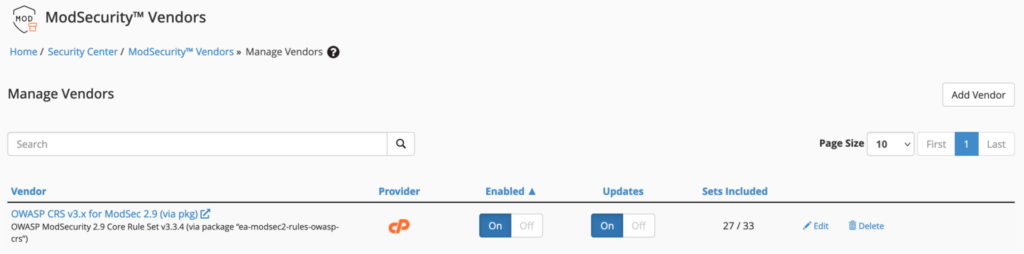
This rules have been tested OWASP CRS 3.x. Make certain your server is using the correct CRS.
In WHM, navigate to Home / Security Center, ModSecurity™ » Manage Vendors.
Next, navigate to Home /Security Center /ModSecurity™ Tools.
Click the "Rules List" button
Click the "Edit Rules" button.
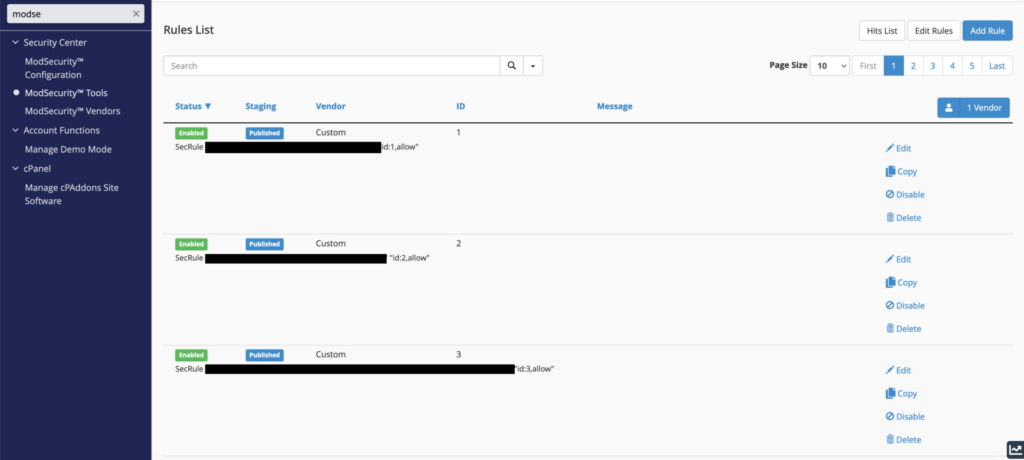
Copy and paste the rules set. Be aware of the rule IDs. It may be necessary to change the rule ids to avoid duplicate conflicts. Rules with duplicate IDs will not be saved my ModSecurity Tools and will alert you with an error message.
Adding Rules to .htaccess
To enable the rules in .htaccess, copy and paste the rules wrapped that are wrapped in the modsecurity.c conditional.

Testing the new rules
When done adding the rules, restart Apache. The final step is to test your new configurations and verify that the new rules is not throwing a false positive. The simplest method is to resend the previously offending request to the web server and then monitor the audit_log file to see if the request is blocked or the ModSecurity message is generated.
You must log in to submit a review.
Leave a Reply